Steps in cleaning a computer
of dead files...
The Easy way*:
1. Click Start then Run and type: "cleanmgr.exe" w/o quotes.
2. Wait for the window to complete, might take a while to scan your machine.
3.Check off the boxes like Temporary files, etc, then OK, then Yes.
*More tips can
be found over at the Disk Cleanup tip page!
The Long way, sometimes the better
way:
FIRST:
1. Open Windows Explorer.
2. Go to Tools tab then click on Folder Options from drop
down.
3. In the new window go to View tab (2nd one over) shown below.
4. Click the round (radio) button to enable “Show hidden files”
5. Uncheck Hide Extensions for known file types (.doc, .exe, .xls, .ppt,
etc) box.
6. Uncheck Hide Protected Operating System files (click Ok on the
warning message).
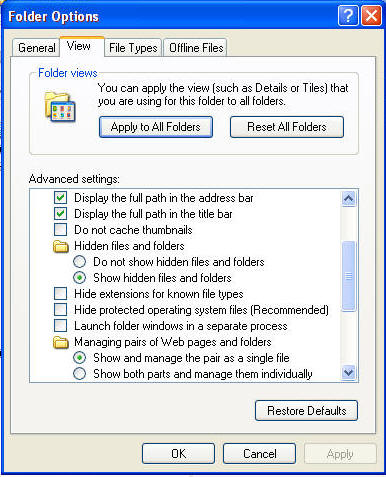
7. Click APPLY and then APPLY TO ALL FOLDERS button (above)
8. Click OK to close.
THEN:
1. Go to “C:\Documents and Settings\USER\Local Settings” where USER
is the person who is logged on. In Vista actually go to the USERS
folder instead of Documents&Settings.
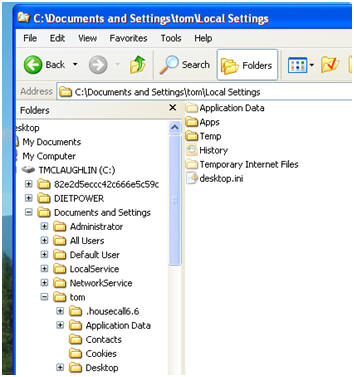
2. Go into 'Temp' folder and delete everything in there.
3. Go into 'Temporary Internet Files' and delete everything in there
or under 'Content.IE5' (ignore and leave index.dat file)
4. Do this for everyone under Document and Settings: Administrator, Default
User, LocalService, NetworkService and any other user listed. Some may not
have all the folders showing, or have anything in it.
5. Go back to the C: drive and then head over to C:\WINDOWS folder. There is
a 'TEMP' folder in there as well. Empty that one also.
FINALLY:
You may want to turn off viewing 'hidden files and folders and system
files.
- Just reverse the FIRST part above, meaning put the check boxes back
in (maybe except Hide extensions one) system files and the radio button for
'Do not show hidden files and folders'.
NOTE: If at any time you suspect a
virus, go to
http://housecall.trendmicro.com to do an online virus scan.
If you are unable to do any of the above steps, reboot, keep pressing F8
- but don't hold after it reboots, pick Safe Mode with Networking
from the menu and try from there.

 contact: